Trimble CrewSight Adapting to New Jobsite Standards

As we find new ways to work safer and smarter in a post-Covid-19 world, jobsite access control will be more important than ever.

Trimble CrewSight is the leading platform combining a jobsite access control system with a worker database for increased control, site security and employee safety.

Trimble has been working hard with CrewSight users to adapt the platform to add new Covid-19 protocols into their jobsite access control programs. New adaptions and standard CrewSight features include:

Create Zones for Temperature Screenings & Workforce Management

Many jobsites are taking temperatures of workers before they are allowed onsite as well as creating Zones within the project with guard monitoring to track worker movement and restrict access.  Over the last few weeks, Trimble has adapted new workflows to support this process.

Touch-free entry tracking

Jobsite access management using handheld devices with RFID or mobile devices with the CrewSight Mobile App.

Information at your fingertips

Quickly get up-to-date information on who and how many contractors are on-site on the CrewSight dashboard and reporting in both the web interface and mobile app — giving you the ability to ensure compliance and the ability to communicate via instant text with everyone onsite.

Restrict Worker Access

If for any reason a worker should not be allowed onsite, CrewSight managers may immediately restrict badge access to that jobsite. CrewSight even allows you to automatically create new valid dates for allowing access back on to the jobsite.

There’s no doubt as we look toward the future we will all have to change the way we operate. Trimble CrewSight is the platform that will ensure your company’s smooth transition into new operating models.

BuildingPoint Support Plans Keep You Covered!

At BuildingPoint Midwest & Gulf Coast our support plans and warranties have got you covered.

We’re not interested in just selling you construction technology solutions that change the way you work, but we want to ensure its full functionality over its lifespan.

That’s why we recently embarked on a plan to keep all our valued customers updated on all their support and warranty agreements.

Jill Husick has taken over the administration of our warranty and support plans and will be contacting you in 2021 to discuss your current plan and other offerings for the future.

This isn’t a high-pressure sales pitch, but rather important information for you to ensure your gear is always covered and operating at its peak capabilities.

If you’d like to know more about our Bronze, Silver and Gold Suppot Plans, please visit our website now and view all three options. And if you’d like to discuss your options as 2021 begins, contact Jill via email or give her a call at 630-283-8874.

VIEW SUPPORT PLANS NOW!

Floor Analysis Revolutionized with the Trimble X7 + FieldLink

Floor Analysis has never been easier! 

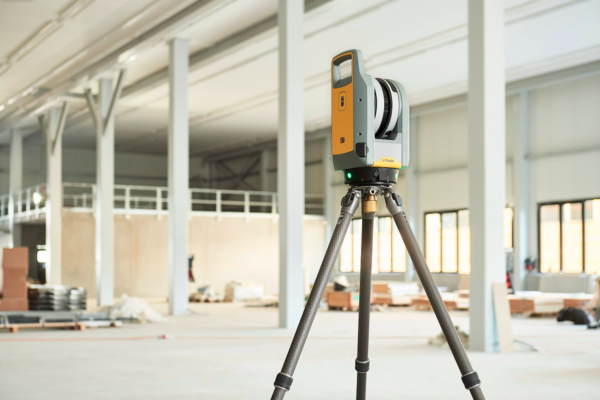
We’re excited to introduce the new Floor Analysis tools in the latest update to Trimble’s FieldLink Software for the X7 3D Scanner!

Check out these amazing new capabilities for IN FIELD floor analysis and reporting!

Trimble X7 3D scanner users with FieldLink v5.8 are seeing the following NEW powerful and time-saving features:

  • Complete in-field FF/FL reports in minutes in FieldLink v5.8 on the field tablet
  • No need to export any data to get FF/FL or Floor contours for layout
  • Immediately layout high/low contours with the X7, or switch over to your RTS/RPT instrument to layout
  • PDF Export of FF/FL report and PDF Export of contour map/reports
  • Set up the X7 in a drawing/model so your floor analysis overlays right over your drawing/model in the field
  • No office work needed for in depth floor analysis and high/low contour layout

As you can see these new features can save your company hours of work both in the field and back at the office.

The Trimble X7 with FieldLink v5.8 is the only scanner and software combination on the market today that can complete these tasks in mere minutes.

BuildingPoint Midwest and Gulf Coast is an authorized Trimble dealer and we are currently scheduling demos of the X7 with FieldLink v5.8. Contact your BuildingPoint representative today to schedule!

Is Your Company Ready for 3D Construction Scanning?

When you’re working with complex work zones, precise operations, and painstaking procedures, 3D laser scanning is your most cost-effective and efficient solution to streamline the collection of accurate measurement data on complicated construction and design projects.

When analyzing the current conditions of your site, BIM technologies like 3D scanning tools can instantly and accurately collect comprehensive measurement data for construction jobsite measurement and pre-construction processes.

Of course, with innovative 3D laser site scanning technologies- and other similar technologies- comes a lot of questions and misconceptions.

MYTH 1— ALL SCANNERS ARE CREATED EQUAL

Depending on the range, complexity, and size of your worksites, it’s important to consider whether you’re using the right scanner for the space. Level of Detail (LOD) is a vital factor in effective modeling, so the quality and accuracy of your scanning equipment will certainly have an impact on the value of your results.

MYTH 2 — 3D SCANNING IS TOO EXPENSIVE TO IMPLEMENT

A high upfront cost can make implementation seem scary, but it’s been proven time and time again: 3D scanning technologies deliver ROI on every operational front. For example, EC Electric experienced an incredible 90 percent reduction in labor costs from their initial estimate, which didn’t account for the use of 3D scanning technology.

MYTH 3 — NEW TECH TRAINING IS A HUGE UNDERTAKING

With the right tools and software, a day in the increasingly competitive construction market is easier and more efficient than ever. In a contractor survey, 65% of respondents reported significant ROI, with the majority of the remaining 35% admitting to not employing ROI tracking.

Your company shouldn’t undertake 3D scanning without conducting a cost/benefit analysis first. Click the link below for our handy guide for doing just that.

How Efficiently Are You Managing Layout?

Today construction firms are managing layout in 1 of 3 ways

  1. You’re handling layout using the manual process that’s “always worked in the past.”
  2. You’re handling layout digitally using a laser level and/or total station, but still working with manual (paper) plans and output.
  3. You’re handling layout using a robotic total station (RTS) or rapid positioning tool (RPT), working from a 3D model, and feeding your data back into the BIM workflow.


If you’re in the first two buckets, you probably know there’s a better way to do things. Isn’t it time to make the switch to and improve your firm’s capabilities?

In this FREE eBook, you’ll get all the reasons you need to ditch manual methods―and learn how to convince your boss (or yourself) it’s time for a change, too.

Gain Control Over Your Project Documents with ProjectSight

Any construction firm that’s still using paper to manage their projects likely will admit it’s not the most efficient way of operating, especially when there are any number of software solutions that can do the job seamlessly. But being stuck in an old way of doing business is not uncommon in construction — an industry that’s often one of the last to adopt readily available technology.

For companies still using paper drawings in the field and in the office in 2021, you should know you are putting yourself at a significant competitive disadvantage in your space. Project control software like Trimble ProjectSight makes project teams significantly more productive by connecting people and technologies with timely information that is so complete it unites the virtual and real worlds.

ProjectSight streamlines productivity. No more searching through multiple systems to find the drawings and information you need to give an answer fast. ProjectSight ensures all stakeholders are working from the most up-to-date information available whether you’re in the field or in the office. Additionally, ProjectSight allows companies to:

Get Lean

Team members can collaborate and converse on issues rather than filling out information on old paper-based forms. ProjectSight automates notifications and eliminates wasting time on unproductive tasks.

Establish trust

ProjectSight establishes trust with all project stakeholders. Information is thorough, complete and a record of communication is available so you and your team gain credibility and maintains professionalism.

Create accountability

ProjectSight helps you operate as a team and ensures everyone is held accountable.

How to Say Goodbye to Paper in the Field and Office

Discover More About ProjectSight

Trimble ProjectSight is the next-generation project control software from the makers and developers of Prolog. BuildingPoint Midwest & Gulf Coast is an authorized Trimble ProjectSight partner. Contact us today to talk about how ProjectSight can transform your teams project controls systems.

Is Your Robot Accurate? Run This Test

As temperatures begin to fluctuate, it’s important to ensure changes in conditions aren’t affecting the accuracy of your equipment.

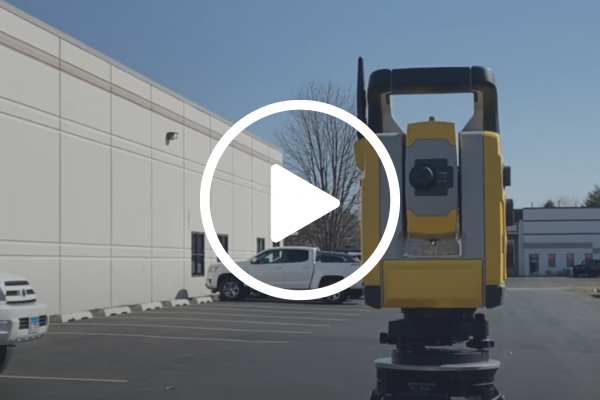
At BuildingPoint Midwest & Gulf Coast we recommend your Trimble RTS unit undergo an Auto Lock Collimation test for every 10-15°F of sustained temperature change.

If you’ve never performed an Auto Lock Collimation test, we’ve got you covered. The above video provides a step-by-step guide to complete this process that should take you less than 5 minutes.

If you have any questions about this procedure or any other support needs, please call our support line at 630-821-8076.

BuildingPoint Midwest & Gulf Coast Offers On-Site FieldLink Training

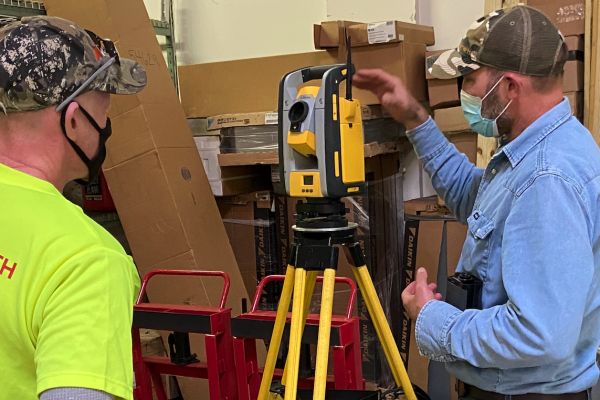
BuildingPoint Midwest & Gulf Coast is proud to offer your teams onsite Trimble FieldLink training. We will travel to your job site to get your team up and running using Trimble digital layout, 3D scanning and mixed reality tools.

Taught by our training team with over 35 years of experience in the field your field professionals will learn:

  • GPS for Site and Civil
  • Accuracy for Critical Connections
  • Complete the Office to Field Loop
  • Quality Control With As-built and Scanning
  • Site Control Across Solutions

To learn more about either our half-day or full-day onsite training sessions, call our support team at 630-821-8076.

Visit our ProServ page for more about our other outsourced services.

Construction Scanner Comparison: X7 vs. Leica RTC 360 vs. FARO S150

With laser scanning technology constantly evolving, it is necessary to periodically compare the different platforms available in the market.

To do so, we tested a Leica RTC 360 against a FARO S150 and a Trimble X7 performing three simulated scanning scenarios. In each of the scanning situations, we tried to keep the comparisons as similar as possible in terms of comparable settings used, similar scanner positions, and methods. For the Trimble X7, less scans were captured with each scenario due to different settings.

Download the entire comparison report by clicking the button below.

DOWNLOAD NOW

Is It Time for New Construction Software?

Technology is changing nearly every aspect of how business around the globe is conducted — and construction is no exception. Yes, your organization might have all the tools in place now to get the job done, but is your company really scaled to meet modern demands and reap modern rewards? Here’s a quick exercise:

  • Check each of the following challenges you or your organization has had to deal with over the past 24 months:
  • Had a project run over budget or well beyond the expected timeline
  • Had to cover a major, unplanned capital expenditure like replacing a piece of equipment or a server
  • Suffered from significant productivity issues that slowed work or created problems
  • Seen unnecessary material waste that ate into your bottom line
  • Struggled with billing to keep cash flow fluid and/or ensuring your own bills are paid on time
  • Struggled with hiring, onboarding and training new employees
  • Lost money on a project that wound up not being worth the hassle
  • Had a communication breakdown between project teams or other subcontractors due to a lack of accurate project data
  • Experienced a business disruption that forced you/your company to have to cut costs/ resources in order to keep your business running effectively
  • Spent too much time/too many resources on administrative tasks due to manual workflows or disconnected data
  • Had trouble pulling together current project data for reports to owners or other project stakeholders
  • Experienced a data security breach, lost sensitive documentation or other incidents that put your company’s business at risk

If you’ve experienced one or more from the list above, it might be time to invest in a connected construction management software suite like ViewpointOne. Powered by real-time data and workflows, ViewpointOne solutions connect contractors’ people, projects and processes together to improve project collaboration and provide next-level business controls. Let us show you how easy your modern construction management experience could be. Contact us now!